Brackets
Introduction
The brackets included in this table are used to assemble elements on printed magnetic steel. In the drawing above, an L-bracket is shown. Any type of bracket can be inserted in this table and the code will be the distinguishing feature. The purpose of this table is to provide the bracket overhang from the element and the fixing quotes, so that the overall dimensions of the element can be calculated correctly.
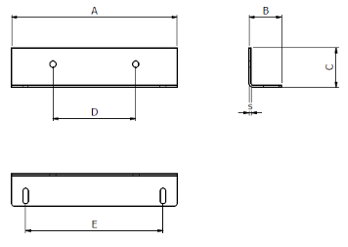
Table fields (Brackets)
- Magnetic steel:
Suitable type of printed magnetic steel
Examples:
EI or EIT (three-phase) or UI (for two-column elements) - Length:
Printed magnetic steel length for which the bracket is usable
Examples:
If it is an EI120 here you would enter 120 - Description: Extended description of the bracket, that can be of help in identifying it.
- Code:
Code identifying the bracket. Below is a list of the codes normally used:
ANG = L-bracket
PMP = Clamp plate
PM = Plate
TEL = Frame with through-hole
TELF = Frame with a threaded hole
For other shapes, please contact us to choose the correct codes. - Material: Material abbreviation. By opening the drop-down menu of the Material field, you see a list of all available materials and can choose the correct abbreviation.
- Overhang_A: Bracket overhang in relation to the width of the element.
- Overhang _B: Bracket overhang relative to the depth of the element.
- Overhang _H: Bracket overhang relative to the height of the element.
- Fixing_L: Fixing the dimension of the element in the direction of the width.
- Fixing_B:
Fixing the depth dimension of the element to the individual bracket. It is useful for calculating the fastening depth dimension of the element.
Example:
Fixing_B = 15
Core thickness = 70
Fixing dimension of element in depth = 2x15 + 70 = 100 - Buttonhole L: Dimension L of the buttonhole accommodated by the bracket (in the sense of width).
- Buttonhole B: Dimension B of the buttonhole accommodated by the bracket (in the sense of depth).
- Weight kg: The value is normally given by the supplier. Otherwise, you can calculate it with volume x 7.65 (specific weight of the steel)
- Article: To select the material, use the article code of your management system. This value will allow the applications to retrieve the description and unit cost into the table Material Unit Cost by importing the list of materials available in your warehouse.